Seven Days to Integration Hub Mastery
Welcome to Integration Hub! In order to get you started using IHub to integrate partners and applications, we’ve created a week-long digital integration tour with an IHub expert. Meet the expert and get started with IHub concepts in this video. Once you’ve watched it, you’re ready to take the tour.
On Day One, we show you:
-
A video in which our expert identifies scenario concepts and shows you the actual IHub screens that enable an example of a basic routing scenario to work.
-
A tutorial that provides step-by-step instructions for implementing this example of the scenario in your environment.
After Day One, we replace the tutorial with a functional overview that illustrates the broader concepts of the scenario.
Day One: Basic Routing
We start with one of the most common scenarios in digital integration: Receiving, mapping, and sending a document from a partner to an internal endpoint.
This tutorial provides step-by-step instructions for implementing this scenario in your organization.
Day Two: Basic Routing, EDI-style
On Day Two, we take a look at an example of an EDI-centric basic routing scenario, in which your organization receives a document from a Partner. If IHub has been configured to receive a document of this Document Type, IHub routes the document to an internal API. If IHub has not been configured to receive a document of this Document Type, IHub rejects the document.
So it looks like this:

See how it works in this functional overview while you watch this [insert video].
Day Three: Shared Routing
On Day Three, in this example of a shared routing scenario, your organization wants to receive the same Document Type Y from two different Partners, map it to an internal standard Document Type X, and send it to a backend API.
So it looks like this:
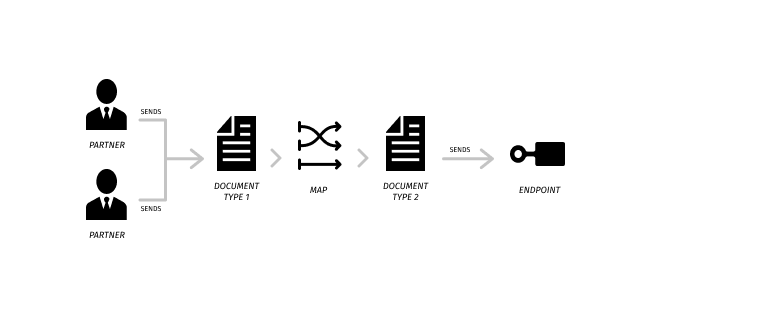
See how it works in this functional overview while you watch this [insert video].
Day Four: Override Routing
On Day Four, in this example of an override routing scenario, your organization expects to receive documents of a single Document Type from multiple Partners.
If IHub has been configured to receive a document of this Document Type, IHub routes the document to an internal API.
However, one partner uses a variation of the Document Type, so you must override the standard Map that you use to transform that partner’s Document Type to your internal Document Type before routing.
If IHub has not been configured to receive a document of this Document Type, IHub rejects the document.
So it looks like this:
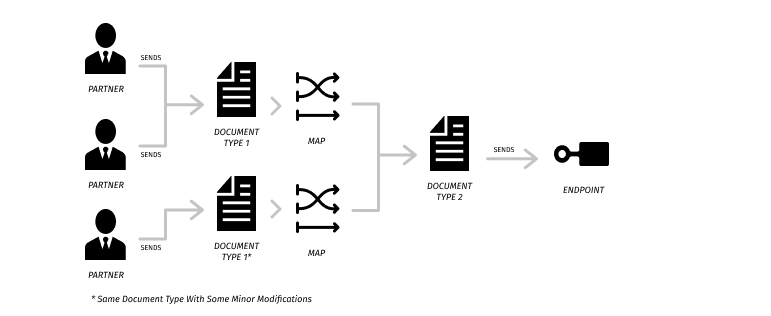
See how it works in this functional overview while you watch this [insert video].
Day Five: Multicast Routing
On Day Five, we look at an example of a multicast routing scenario. An Application sends a Document to three other Applications. Two of the Applications require the Document as-sent; the third requires the payload to be mapped.
So it looks like this:
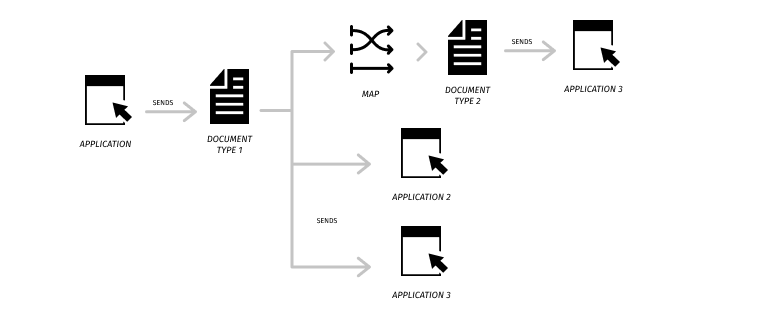
See how it works in this functional overview while you watch this [insert video].
Day Six: Chained Routing
On Day Six, we look at an example of a chained-transactions routing scenario. An Application sends a Document to a Partner.
It looks like this:
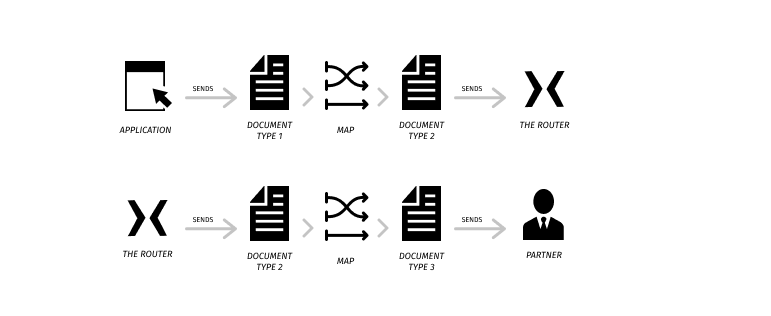
See how it works in this functional overview while you watch this [insert video].
Day Seven: Advanced Topics
Day Seven. Relax! If you’ve come this far, you are ready to join the ranks of an international group of professional who are using IHub to integrate applications and partners.
If you’re hungry for more, take the next steps by learning Multi-route and Content-Based-Routing scenarios.